It's always a pity to know that users leave us.
We also encourage you to provide your feedback regarding using PhotoADKing via our help center and the reason you want to delete your account - it would be greatly appreciated from our end.
Here's how to delete:
1. From the top right-side corner of the homepage, click on your account using a drop-down arrow and then the Account options.
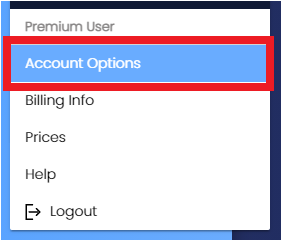
2. Click on the Delete account option.
3. Click on the Delete option from the pop-up to delete the account permanently.
Note that account deletion is irreversible. You will lose access to all created designs, and your data will be permanently deleted.
Was this article helpful?
That’s Great!
Thank you for your feedback
Sorry! We couldn't be helpful
Thank you for your feedback
Feedback sent
We appreciate your effort and will try to fix the article